
Microsoft 365 Copilot vs a Custom AI Assistant: A UK Buyer’s Guide
Choose the right route by examining where work happens, which data matters, what the assistant must do and how much control the business needs.
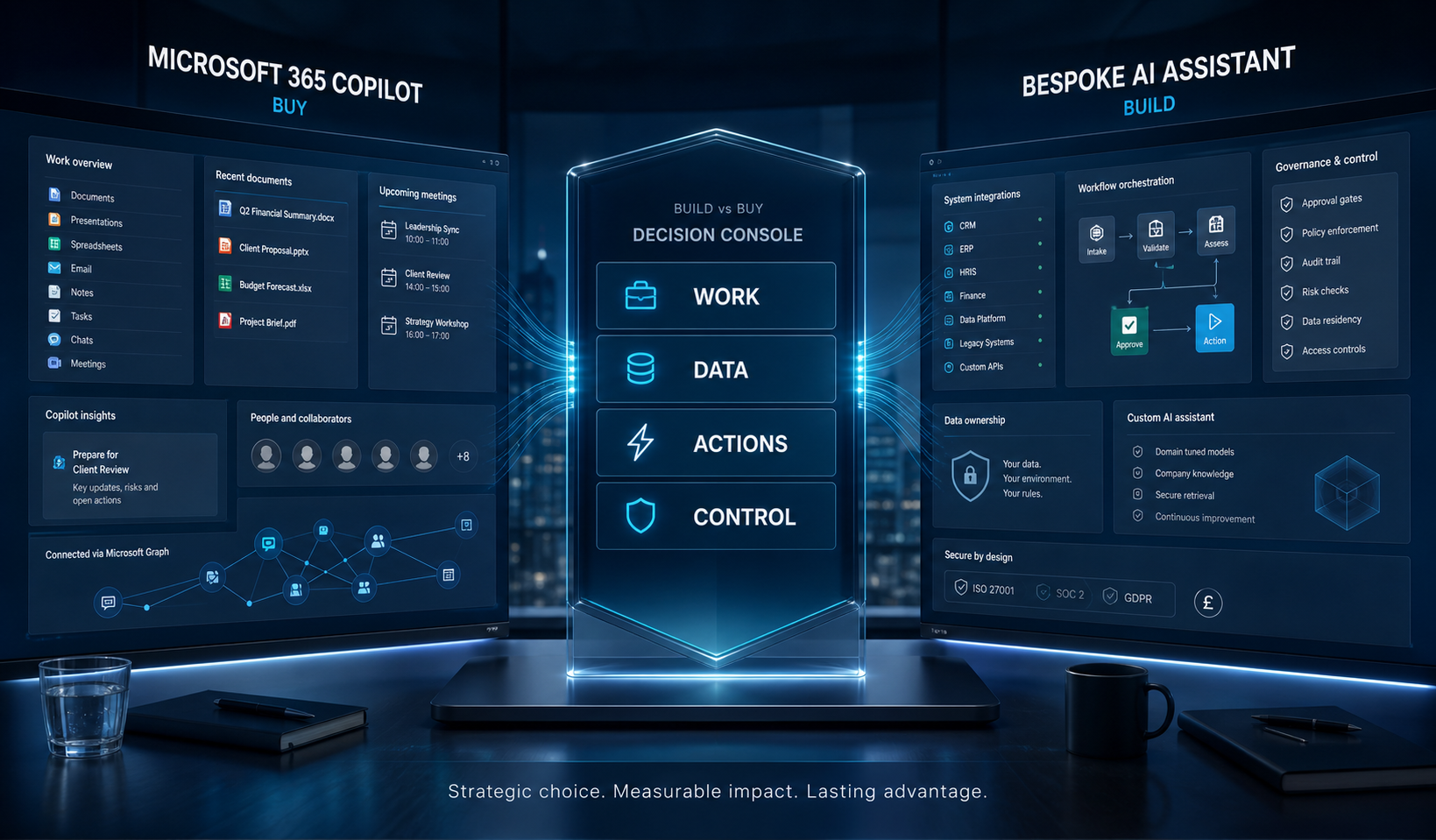
The direct answer
Choose Microsoft 365 Copilot when the value sits mainly in Word, Outlook, Teams, meetings and SharePoint. Extend it when those workflows need selected external data or actions. Build a custom AI assistant when competitive advantage depends on proprietary processes, multiple business systems, a tailored user experience, or deeper control over orchestration and deployment.
Microsoft renamed Microsoft 365 Copilot to Microsoft Copilot in August 2026, although some licences, capabilities and interfaces still use the former name. This guide uses the familiar Microsoft 365 Copilot wording where it helps buyers compare options.
This is not a feature-list contest. The right answer follows the operating model. Microsoft says Copilot uses Microsoft Graph content the signed-in user is permitted to access, and that prompts, responses and Graph-accessed data are not used to train foundation models. Copilot Studio can add knowledge and tools through connectors, agent flows and APIs. A bespoke assistant opens more design freedom, but also makes your organisation and development partner responsible for more architecture, security, evaluation and support.
Six criteria that reveal the right AI assistant
Work surface
Copilot is strongest where work already lives in Microsoft 365. A bespoke assistant can serve a portal, operations console, mobile app or customer journey designed around the task.
Data reach
Microsoft Graph grounds Copilot in content each user can access. A custom build can combine governed retrieval from CRM, ERP, databases, document stores and proprietary APIs.
Action depth
Summarising and drafting need less orchestration than quoting, approving, updating records or coordinating several systems. The more consequential the action, the more explicit controls matter.
Experience fit
A familiar Copilot interface reduces adoption friction. Bespoke software earns its cost when roles need a purpose-built journey, external access or embedded AI inside an existing product.
Governance
Microsoft states Copilot honours existing Microsoft 365 permissions. That makes permission hygiene essential; neither a licence nor a model fixes overshared files or unclear ownership.
Strategic value
Buy commodity productivity. Customise differentiated capability. Build where process knowledge, integration depth or customer experience can create measurable advantage.
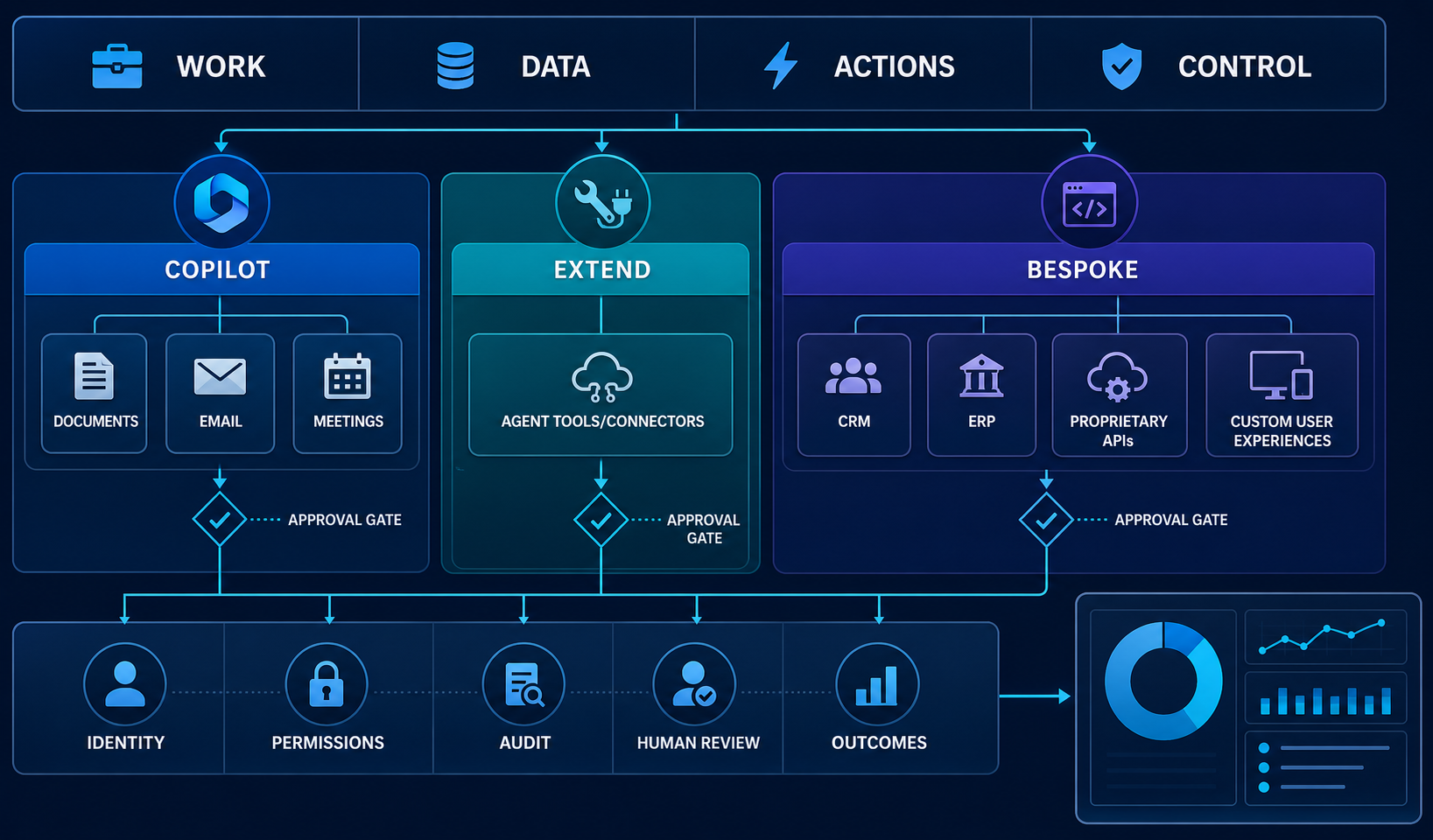
Evidence to gather before choosing
A four-step build-or-buy process
Use the same workflow and evidence to test all three routes. A short, controlled comparison is more reliable than choosing from demonstrations alone.
Frame the decision
Define the user, trigger, desired outcome and current cost of the workflow. Separate everyday productivity from a process that creates customer or operational advantage.
Map data and actions
List every source the assistant must read and every system it may change. Classify permissions, personal data, latency needs and the consequences of a wrong action.
Prototype the narrow path
Test Copilot, an extension and a bespoke slice against the same representative cases. Compare answer quality, integration effort, control gaps, adoption and total operating burden.
Pilot with controls
Launch to a bounded cohort with logging, human approval, escalation and outcome measurement. Expand only after evidence shows the solution is useful, safe and supportable.
Copilot, extension or bespoke: practical comparison
| Decision area | Microsoft 365 Copilot | Extend with Copilot Studio | Bespoke AI assistant |
|---|---|---|---|
| Best fit | Individual productivity in Microsoft 365 | Microsoft-centred work with selected knowledge and actions | Differentiated, cross-system or customer-facing workflows |
| Data | Microsoft Graph and permitted organisational content | Microsoft content plus configured connectors and knowledge | Chosen APIs, databases, files and model services |
| Actions | Built-in app assistance | Connectors, flows, REST APIs and agent tools | Purpose-built orchestration and interfaces |
| Control burden | Lower build burden; permission hygiene remains critical | Shared platform and solution governance | Highest design freedom and engineering responsibility |
| Choose when | Needs are common and Microsoft-centric | The middle path covers the gap cleanly | Unique process value justifies ownership |
UK governance is part of the product decision
For any route, identify the lawful purpose for personal-data processing, minimise unnecessary data, document access, test accuracy and provide meaningful human review where outcomes could affect people. The ICO’s AI guidance should inform the assessment; it does not turn a platform choice into automatic compliance. For Copilot, review existing SharePoint and Microsoft 365 access because the assistant respects the permissions users already have. For bespoke systems, make identity, retrieval boundaries, retention, audit and supplier responsibilities explicit in the architecture.
Make the decision with a working proof, not a sales demo
Forge Cloudify can map the workflow, compare platform and bespoke routes, prototype the critical path, connect business systems and build the governance into delivery.
Frequently asked questions
Is Microsoft 365 Copilot the same as a custom AI assistant?
No. Microsoft 365 Copilot is designed around Microsoft 365 work and data. A custom assistant is designed around your chosen workflows, systems, user experience and control model. Copilot can also be extended, so the practical decision has three lanes: adopt, extend or build.
When is Microsoft 365 Copilot the better choice?
It is usually the strongest starting point when most target work happens in Word, Outlook, Teams, Excel and SharePoint, existing Microsoft permissions are well governed, and the desired outcomes are personal productivity, drafting, summarising and finding information.
When should a UK business build a bespoke AI assistant?
Consider bespoke development when the assistant must operate across CRM, ERP, portals or proprietary APIs; follow a distinctive business process; enforce custom approvals; support customers or partners; or provide an experience and intellectual property the business controls.
Can Copilot be extended instead of replaced?
Yes. Copilot Studio supports knowledge sources, connectors, agent flows, REST APIs and other tools. An extension can be the sensible middle path when Microsoft 365 is the main workplace but the use case needs selected external data or governed actions.
What should be checked before an AI assistant pilot?
Map the exact workflow, data sources, user permissions, personal-data purpose, human review points, failure handling and success measures. Test with a bounded user group and representative cases before allowing the assistant to take consequential actions.
Related services: AI Development, Software Development, Cloud & DevOps, and All Forge Cloudify Services.